UiPath Task Capture Alternatives (2026): A Better Way to Capture Real Work

UiPath Task Capture Alternatives (2026): A Better Way to Capture Real Work

Avery Brooks
January 26, 2026

ClearWork Vs. UIPath Task Capture - Rapid and Comprehensive Automated Process Mapping

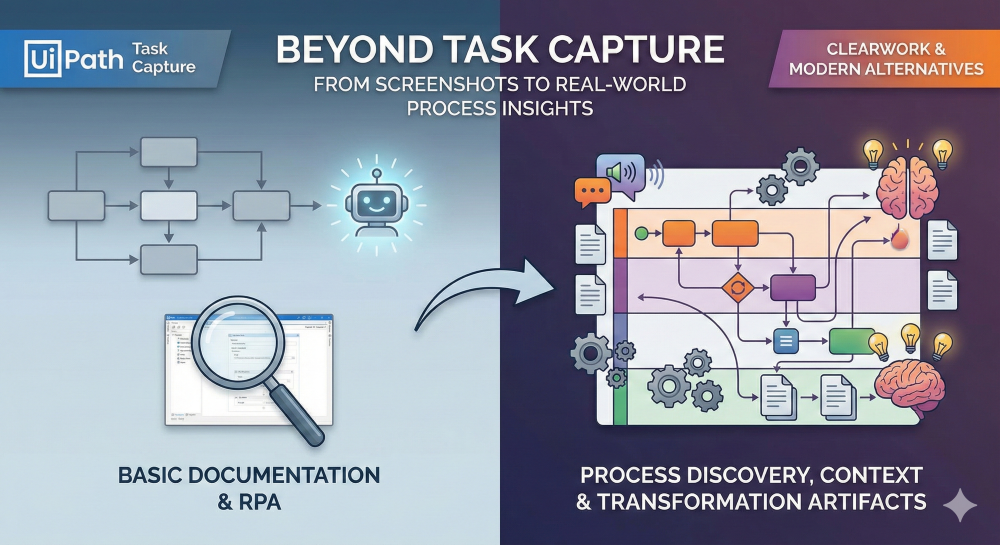
Organizations searching for UiPath Task Capture alternatives usually aren’t questioning whether to document processes — they’re questioning whether Task Capture is enough for modern transformation work.

UiPath Task Capture is useful for basic task documentation, especially inside UiPath-led RPA programs. But as transformation teams move faster, involve more stakeholders, and need delivery-ready artifacts, many teams hit its limits quickly.

This article breaks down:

  • What UiPath Task Capture does well
  • Where it falls short for real-world discovery
  • What modern alternatives do differently
  • Why ClearWork is a compelling alternative for teams that need more than screenshots

What Is UiPath Task Capture?

UiPath Task Capture is a lightweight documentation tool designed to help users record repetitive tasks and convert them into step-by-step documentation.

At its core, it captures:

  • Screen screenshots
  • Mouse clicks and keystrokes
  • Basic application context
  • Linear step sequences

The output is typically used for:

  • RPA documentation
  • Training material
  • High-level SOPs
  • Input to UiPath Studio for automation design

It’s simple, structured, and tightly integrated into the UiPath ecosystem.

Where UiPath Task Capture Works Well

UiPath Task Capture is a good fit when:

  • You’re already standardized on UiPath RPA
  • You need single-user task capture
  • The goal is automation design, not end-to-end discovery
  • Processes are stable and repetitive
  • Documentation requirements are basic

For small automation efforts, it does its job.

The Core Limitations of UiPath Task Capture

The challenge is that task capture ≠ process discovery.

Here’s where most teams run into friction.

1. Screenshot-Based, Not Insight-Based

Task Capture focuses on what was clicked, not:

  • Why decisions were made
  • What exceptions occurred
  • Where handoffs happen
  • How work actually varies

It records activity, but it doesn’t capture context or intent.

2. No Narrative or Voice-Based Discovery

Users can’t:

  • Explain what they’re doing as they work
  • Describe edge cases or workarounds
  • Call out system limitations
  • Add qualitative insight in real time

This forces teams back into interviews and workshops — the very things they were trying to avoid.

3. Linear Tasks, Not Real Processes

UiPath Task Capture outputs:

  • Step-by-step flows
  • Static documentation

But it doesn’t produce:

  • Swimlane diagrams
  • Cross-role process views
  • Variants and exceptions
  • End-to-end workflows

Real processes rarely follow a straight line.

4. Limited Outputs for Delivery Teams

The output is largely:

  • Documentation PDFs
  • UiPath-friendly artifacts

It doesn’t automatically generate:

  • Process diagrams
  • Business-friendly flows
  • Requirements
  • Epics, stories, or tasks
  • Transformation-ready artifacts

That translation work still happens manually.

What Teams Actually Want from a UiPath Task Capture Alternative

Based on how teams search and buy today, a true alternative must do more than capture clicks.

Modern expectations include:

  • Screen recording + explanation
  • Voice or narrative capture while working
  • Automatic interpretation of what matters
  • Multiple artifact types from the same recording
  • Outputs usable by business, IT, and delivery teams
  • Faster discovery without workshops

This is where ClearWork takes a different approach.

ClearWork vs UiPath Task Capture: A Capability Comparison

ClearWork Overview

ClearWork is built for Automated Process Discovery, not just task capture.

Instead of documenting what happened, ClearWork focuses on capturing how work actually gets done — and turning it into usable transformation artifacts.

UiPath Task Capture vs ClearWork — Capability Comparison

A quick, scannable breakdown of what each platform supports for capturing work and generating process artifacts.

Capability UiPath Task Capture ClearWork
Screen recording Screenshots Full session recording
Voice narration while recording No Yes
Context + intent capture (decisions, exceptions) Limited Built-in
Process view Linear steps End-to-end workflows
Swimlane diagrams No Yes
Flowcharts No Yes
SOPs & documentation Basic Automatic + structured
Requirements & delivery artifacts (epics/stories/tasks) No Yes
Multi-role / cross-team processes No Yes
Business + IT usability Limited Yes

Why ClearWork Is a Strong UiPath Task Capture Alternative

1. Record Once, Generate Everything

With ClearWork, users:

  • Record their screen
  • Talk through what they’re doing
  • Explain decisions, exceptions, and workarounds

From that single session, ClearWork can generate:

  • Process diagrams
  • Swimlane flows
  • SOPs
  • Process narratives
  • Documentation
  • Delivery-ready artifacts

No rework. No translation layer.

2. Built for Real-World Discovery, Not Just Automation

ClearWork supports:

  • Variants and exceptions
  • Cross-team workflows
  • Human judgment points
  • System gaps and manual work

This makes it ideal for:

  • ERP transformations
  • CRM redesigns
  • Service operations
  • Pre-automation discovery
  • AI readiness initiatives

3. Faster Discovery Without Workshops

Instead of scheduling workshops:

  • Users capture work asynchronously
  • Stakeholders contribute on their own time
  • Discovery runs in parallel, not sequentially

Teams move from weeks of discovery to days.

4. Outputs Designed for Delivery Teams

ClearWork doesn’t stop at documentation.

Artifacts can be used directly by:

  • Process excellence teams
  • Transformation leaders
  • Implementation partners
  • Product and delivery teams

This bridges the gap between understanding work and building what’s next.

When UiPath Task Capture Still Makes Sense

To be fair, UiPath Task Capture is still useful when:

  • Your only goal is RPA documentation
  • You’re automating highly repetitive tasks
  • You don’t need process context
  • You’re fully UiPath-centric

But once discovery expands beyond automation design, most teams outgrow it quickly.

Final Thoughts: Choosing the Right Alternative

If you’re searching for UiPath Task Capture alternatives, the real question is:

Do you want to document tasks — or understand how work actually happens?

UiPath Task Capture documents activity.

ClearWork captures reality, context, and intent — and turns it into artifacts teams can actually use.

Frequently Asked Questions: UiPath Task Capture Alternatives

1. What is UiPath Task Capture best used for?

UiPath Task Capture is best suited for documenting individual, repetitive tasks—primarily in support of RPA initiatives. It works well when the goal is to capture step-by-step user actions and convert them into basic documentation or automation inputs.

However, it is not designed for end-to-end process discovery, cross-role workflows, or transformation planning. Most teams still need interviews and workshops to fill in the gaps.

2. Is UiPath Task Capture the same as process discovery?

No. UiPath Task Capture focuses on task-level documentation, while process discovery focuses on how work actually flows across people, systems, and decisions.

Task capture records what was clicked.
Process discovery explains why it was done, who was involved, where exceptions occur, and how the process really operates. For transformation work, task capture alone is rarely sufficient.

3. Why do teams look for UiPath Task Capture alternatives?

Teams typically start looking for alternatives when they need to:

  • Capture context, decisions, and exceptions
  • Document end-to-end processes, not just tasks
  • Support multiple roles and handoffs
  • Generate diagrams, swimlanes, and requirements
  • Reduce reliance on workshops and interviews

As discovery expands beyond automation design into broader transformation efforts, Task Capture’s limitations become clear.

4. How is ClearWork different from UiPath Task Capture?

ClearWork takes a fundamentally different approach.

Instead of screenshots and linear steps, ClearWork allows users to:

  • Record their screen
  • Talk through what they’re doing
  • Explain decisions, edge cases, and workarounds in real time

From a single recording, ClearWork can automatically generate process diagrams, swimlanes, documentation, and delivery-ready artifacts, making it better suited for modern discovery and planning.

5. When should I choose ClearWork over UiPath Task Capture?

ClearWork is the better choice when your goal is to:

  • Understand how work actually happens
  • Capture tribal knowledge at scale
  • Accelerate discovery without workshops
  • Support ERP, CRM, or service transformations
  • Produce artifacts that delivery teams can use immediately

UiPath Task Capture makes sense for narrow automation documentation. ClearWork is designed for full Automated Process Discovery and transformation readiness.

image of team collaborating on a project

UiPath Task Capture is a task documentation tool, while ClearWork is built for full Automated Process Discovery and delivery-ready transformation work.

If your team needs more than screenshots and step lists, it may be time to move beyond basic task capture. ClearWork lets users record their screen, talk through real work, and automatically generate diagrams, documentation, and planning artifacts from a single session. It’s a faster, more complete alternative for modern transformation teams.

Subscribe to our newsletter to stay up to date on all things digital transformation

Continue Your Education

Stakeholder Engagement in the Discovery Phase: Building Alignment and Communication

Read More

From Current‑State Analysis to Gap Analysis: Mapping Your Project’s Starting Point

Read More

Mastering Requirements Gathering: Techniques, Tools & Best Practices

Read More
Table of Contents