
SOP templates feel like the sensible answer.
They’re fast. They’re familiar. They give you a place to start when your team says, “We need documentation.”
And sometimes, that’s enough.
But if you’ve ever rolled out a library of templates only to find that nobody uses them (or worse, people use them and still do the work differently), you’ve hit the real issue: templates help you format knowledge—but they don’t help you capture truth.
In the SOP pillar post, we talked about why the real problem is usually wrong SOPs, not missing SOPs, and why “real work” matters more than “perfect wording.” This spoke post goes one level deeper: templates vs AI SOP generation—what each is good for, where each breaks, and how to choose the right approach in 2026.
A template is a container. It helps you organize sections like scope, roles, steps, and exceptions.
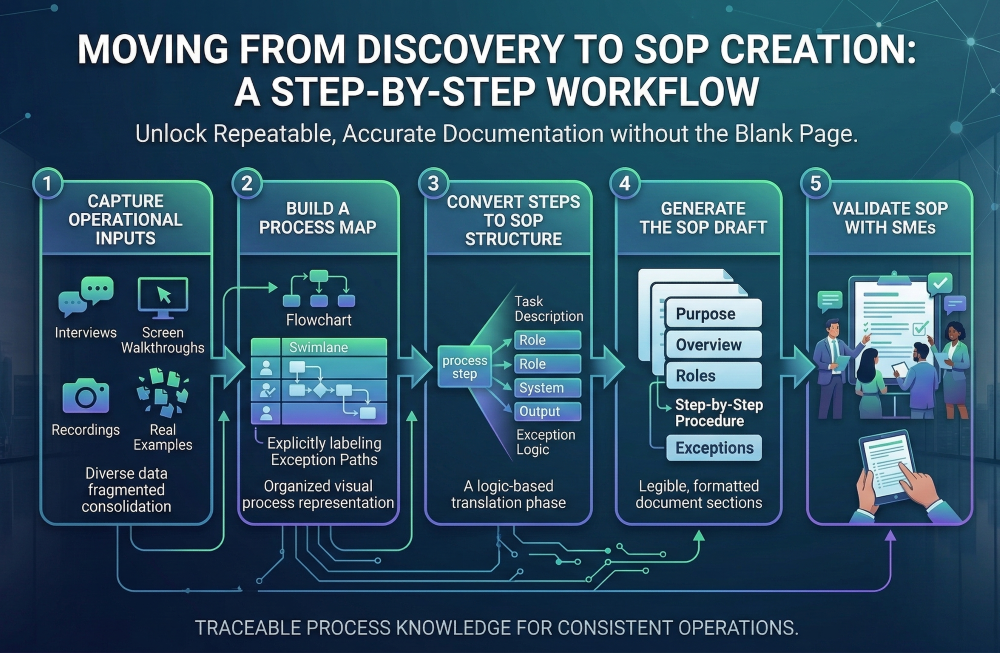
AI SOP generation is a workflow. Done well, it helps you turn messy inputs into a draft quickly, validate with SMEs, and keep the SOP current over time.
Those are very different outcomes.
Even formal SOP guidance recognizes there’s no single “correct” format, and that the right level of detail depends on risk, frequency, number of users, and training availability. Templates help you standardize that structure. They don’t automatically solve accuracy, drift, or maintenance.
Templates are great when the work is stable, the risk is low-to-medium, and you mostly need consistency.
Templates are also a good forcing function. They prompt the questions teams forget to answer:
If your problem is “we don’t even have a consistent SOP format,” templates are a smart first step.
Templates tend to fail for predictable reasons—and the bigger or faster-changing the organization is, the faster those failures show up.
Most SOPs get written during “conflicting priorities” periods where urgent work wins and documentation gets rushed or postponed, which leads to incomplete or outdated procedures.
A template doesn’t change that dynamic. It just gives people a document to partially fill out.
In workshops and interviews, SMEs describe the ideal path. But operational pain lives in exceptions, rework loops, missing data, and last-minute approvals—exactly the things people don’t volunteer unless prompted (or observed). That’s why SOPs drift and stop being trusted.
In regulated environments, SOP guidance emphasizes versioning, controlled access, and preventing outdated versions from being used.
Templates don’t do that. You still need ownership, review cadence, archival rules, and a way to make “current” unmistakable.
Outdated SOPs can drive confusion, errors, inefficiencies, and compliance risk, especially where regulations apply.
That’s the moment templates turn into “documentation debt”—a growing library that takes more time to maintain than it saves.
Let’s be specific: “AI SOP generation” can mean “write me an SOP” from a prompt… or it can mean a system that drafts SOPs from evidence, supports SME validation, and maintains living documentation.
The pillar post is clear on this distinction: the best SOPs in 2026 aren’t authored like essays—they’re assembled like build artifacts: grounded, structured, validated, versioned.
Templates still require someone to do the hardest work: translating messy reality into clean steps.
With an evidence-grounded AI workflow, you shift SME effort from:
That’s how you scale documentation without burning out the people who actually know the work.
This is the 2026 sweet spot:
You get the best of both worlds: consistent format and scalable truth capture.
If you’re deciding what to do next, use this rule:
If your pain is “we need a format,” start with templates.
If your pain is “our SOPs are wrong/outdated and nobody trusts them,” you need an evidence-grounded AI SOP workflow.
If you’re already beyond the “we need a format” phase, templates alone won’t get you where you want to go.
Here’s a simple path that doesn’t require a six-month initiative.
Choose something:
Lock the SOP structure you want: scope, roles, steps, decision points, exceptions, controls (if needed).
Start from what you already have and what people actually do—don’t start with a blank page.
Ask SMEs to confirm:
Formal SOP guidance stresses versioning, controlled access, and keeping outdated versions from being used.
Even in non-regulated teams, the same idea applies: name an owner, set a cadence, define triggers (system changes, policy changes, KPI drift).
Yes—templates are still useful for standardizing structure and helping teams document consistently. They’re a great starting point when your main problem is “we don’t have a repeatable SOP format.”
Because templates don’t solve the hard parts: capturing real workflow variations, surfacing exceptions, and maintaining accuracy over time. Without ownership and governance, SOP libraries drift and lose trust.
AI SOP generation can accelerate drafting from existing materials and real operational inputs, shift SMEs into “review mode,” and support governance (approvals/version history) so documentation stays current. That’s the difference between producing docs and maintaining living documentation.
“Confident wrong” documentation—especially if AI is generating content from a blank prompt or messy, conflicting inputs with no validation workflow. The fix is evidence grounding + SME review + version control.
Keep your template structure, generate drafts from real inputs, validate quickly with SMEs, and publish with ownership, cadence, and version history. Start with one high-impact process and repeat.
See the full capabilities of ClearWork to generate SOPs and other process documentationhere.
One-sentence call to action: If you want to see how to generate SOPs and process documentation from real work (not templates and guesswork), learn how ClearWork does it here: https://www.clearwork.io/ai-sop-generator-process-documentation-software-clearwork Three-sentence call to action: Templates can standardize format, but they don’t solve accuracy, drift, or adoption. ClearWork helps you generate SOPs, process maps, and living process documentation from real operational inputs—then validate fast with SMEs and keep everything current with lightweight governance.
Enjoy our newsletter!