Workflow Documentation Tools vs Process Intelligence Platforms
If you’re searching for “Scribe alternatives”, you’re probably not questioning whether Scribe is good.
You’re questioning whether workflow documentation is enough for what you’re trying to accomplish.
For many teams, Scribe is the fastest way to capture a process and turn it into a clean, step-by-step guide—especially when you need onboarding documentation, enablement assets, and clear “how-to” instructions quickly. Scribe’s browser extension + desktop capture make it easy to document work across tools, and features like Pages and Sidekick/Guide Me make those guides easier to consume and follow.
But transformation leaders, process excellence teams, and delivery teams eventually hit a different need:
“We don’t just need better documentation. We need to understand what’s actually happening across roles, variants, exceptions, and systems—then turn that into delivery-ready outputs.”
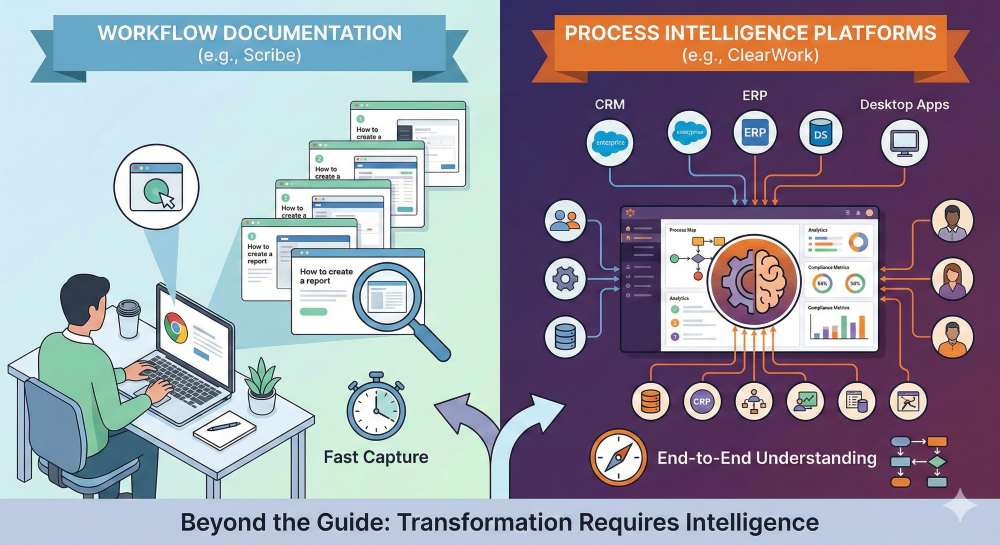
That’s where the space splits into two categories:
- Workflow documentation tools (Scribe and similar)
- Process intelligence platforms (end-to-end discovery → structured understanding → governed, living artifacts)
This post breaks down:
- What Scribe does exceptionally well (and why it’s a category leader)
- Where workflow documentation tools naturally stop
- The real landscape of “Scribe alternatives” (including the tools buyers cross-shop)
- A practical comparison across capability areas, and how ClearWork fits into the bigger picture
What Scribe is (and why it wins)
At its core, Scribe is built for one job: capture a digital workflow as you do it and automatically generate a step-by-step guide.
Scribe’s strengths are very real:
1) Fastest workflow capture → instant guide
Turn on capture, do the workflow, turn it off—guide produced.
2) Works beyond the browser
Scribe’s desktop app supports capturing workflows in desktop tools (Excel, Zoom, legacy software, OS actions, etc.).
3) “Pages” makes SOP-style packaging easier
Pages lets teams combine multiple Scribes into a single document and add narrative context, links, and embedded media.
4) Sidekick + Guide Me improves follow-along execution
Sidekick enables side-by-side viewing; Guide Me turns guides into interactive walkthroughs for “click exactly here” execution.
5) Enterprise-ready privacy controls are unusually strong for this category
Smart Blur / Smart Privacy Screen are built to redact sensitive information from screenshots, with admin-level controls for account-wide redaction policies.
So if your goal is:
“Document this workflow cleanly and share it with a team”
Scribe is very often the best place to start.
Why teams search for “Scribe alternatives” anyway
Scribe tends to be “enough” until you’re trying to do one of these:
A) Enterprise transformation discovery
When you’re mapping current state for ERP/CRM/ServiceNow/Workday change, you need:
- multiple stakeholder perspectives (not one person’s click-path)
- variants and exceptions
- roles and handoffs
- downstream impacts
- evidence-backed requirements and scope outputs
A Scribe captures a workflow instance. Transformation teams often need a process model.
B) “Living documentation” that stays current
Workflow documentation breaks down when:
- processes change frequently
- ownership is distributed
- documentation has to be governed (review cycles, approvals, SME accountability)
- multiple artifacts must stay aligned (SOP ↔ process map ↔ requirements ↔ training)
Scribe supports review and sharing workflows, but the category is still “documentation-first.”
C) Moving from documentation to delivery-ready outputs
Implementation teams rarely succeed with “guides” alone. They need:
- epics / user stories
- requirements and acceptance criteria
- process maps and swimlanes
- scope boundaries and risks
- measurable baselines and opportunity sizing
That’s not a critique of Scribe—it’s a sign you’re operating at a different layer of work.
The real Scribe alternatives landscape (2026)
People searching “Scribe alternatives” often mean one of four things:
- “Another tool that auto-creates guides.”
- “Something more interactive than docs.”
- “A central SOP library with training + compliance.”
- “Process intelligence for transformation.”
Those are different tool categories.
Category 1: Workflow documentation (Scribe-like)
- Scribe (benchmark)
- Similar tools that emphasize capture → step guide (often browser-based; sometimes desktop-first)
Category 2: Interactive demos / guided tours
- Tools focused on clickable walkthroughs (often used for onboarding, enablement, GTM)
Category 3: SOP + training repositories
- Central policy/process libraries with assignments and governance
Category 4: Process mining / task mining / process intelligence platforms
- System-log mining (process mining)
- User-activity analysis (task mining)
- End-to-end discovery → structured understanding → governed artifacts (process intelligence platforms)
Table 1: “Scribe alternatives” by category and best-fit use case
| Category |
What it’s best for |
Representative tools |
Where it tends to fall short |
| Workflow documentation |
Fast “do it once → publish the steps” guides for enablement and SOP sharing. |
Scribe; similar capture-to-guide tools. |
Hard to synthesize enterprise-wide variants, handoffs, exceptions, and requirements without a separate discovery layer. |
| Interactive demos |
Clickable walkthroughs for onboarding, training, and self-serve product learning. |
Interactive demo / tour tools. |
Optimized for guidance, not rigorous process discovery or governed transformation documentation. |
| SOP & training repositories |
Central policy/process libraries, assignments, compliance, and onboarding programs. |
Training/SOP platforms. |
Content still needs to be created and kept current—often relies on manual authoring rather than evidence-based discovery. |
| Process mining |
System event-log analysis (bottlenecks, throughput, conformance where logs exist). |
Process mining platforms. |
Misses “work outside the system” (spreadsheets, handoffs, exceptions, shadow processes). |
| Task mining |
User activity patterns at scale to identify automation candidates and work variability. |
Task mining / desktop analytics tools. |
Often lacks the qualitative “why,” governance workflows, and end-to-end artifact generation for delivery readiness. |
| Process intelligence platforms |
Multi-source discovery → structured understanding → traceable artifacts → continuous updating. |
ClearWork (process intelligence + automated discovery). |
Requires a broader change program than “just document the steps,” but delivers deeper transformation readiness. |
Tip: On mobile, swipe horizontally to view the full table.
Table 2: Capability matrix — Scribe vs “alternatives” vs ClearWork
| Capability area |
Scribe (workflow documentation) |
Other workflow doc tools |
Interactive demo / DAP tools |
Process mining / task mining |
ClearWork (process intelligence platform) |
| Capture a workflow and generate a guide |
Strong |
Strong |
Medium |
Limited |
Medium (depends on discovery method) |
| Cross-app capture (browser + desktop) |
Strong |
Medium |
Medium |
Medium |
Medium |
| Multi-stakeholder discovery (scale beyond one SME) |
Limited |
Limited |
Limited |
Medium (data-driven, less “why”) |
Strong |
| Structured process understanding (roles, handoffs, variants) |
Medium (docs, not models) |
Medium |
Limited |
Medium (system truth, limited human nuance) |
Strong |
| Enterprise governance (approvals, permissions) |
Strong |
Medium |
Medium |
Medium |
Strong |
| Privacy / redaction for captured content |
Strong |
Medium |
Medium |
Medium |
Strong |
| Transformation-ready outputs (requirements, diagrams, metrics) |
Limited |
Limited |
Limited |
Medium (analytics, less narrative) |
Strong |
| Living documentation (continuous updates + review cycles) |
Medium |
Medium |
Limited |
Medium |
Strong |
Note: This matrix is intentionally “approach-based” to match how transformation teams evaluate tool fit.
The key difference: workflow documentation vs process intelligence
Here’s the simplest way to think about it:
Workflow documentation answers:
- “How do I do this task in this tool?”
- “What do I click next?”
- “Can we standardize how people execute this workflow?”
That’s what Scribe is built for, and it’s why it’s a leader. Capture is easy via extension or desktop app. Pages packages multiple guides into a longer doc. Sidekick/Guide Me improves follow-along execution.
Process intelligence answers:
- “How does this process actually work across roles and variants?”
- “Where are the handoffs, exceptions, and failure points?”
- “What’s the current state we can trust?”
- “What requirements, maps, and scope do we need to deliver a transformation?”
- “How do we keep process knowledge current over time?”
That’s the layer ClearWork is positioned to own: real discovery → trusted process intelligence → governed, living documentation and artifacts.
Where Scribe shines (and you should say it out loud)
To keep a “humble but clear” tone, it helps to be explicit:
Scribe is an excellent fit when you need:
- onboarding documentation fast
- support team runbooks
- enablement content for new tools
- SOP-style “how-to” guides that are easy to consume
- strong privacy controls for screenshot-based documentation
Scribe’s redaction tooling is a standout—Smart Blur and Smart Privacy Screen are explicitly positioned to help prevent sensitive information from appearing in captures.
Where teams outgrow Scribe (common “Scribe alternatives” triggers)
This is what usually pushes teams into evaluating “alternatives”:
1) “We need more than one person’s workflow”
Scribe captures what one person did in one run-through. But transformation requires:
- multiple roles
- multiple variants
- exceptions
- handoffs
- controls and dependencies
2) “We need synthesis, not just documentation”
Scribe can assemble guides into Pages, but there are natural limits to how far “docs” can go without a deeper intelligence layer.
A small but telling example: Scribe’s own help content notes that merging multiple Scribes into one larger Scribe isn’t a native function (the workaround is copying steps).
That’s not a knock—it’s just a signal that the product is designed around guides, not modeling.
3) “We need governed, living documentation”
Approval and access controls matter (Scribe does this well), but “living documentation” also needs:
- scheduled reviews
- process ownership by domain
- feedback loops that produce new versions
- artifact relationships (SOP ↔ map ↔ requirements)
4) “We need delivery-ready outputs”
Guides are helpful, but implementation teams still need:
- process narratives for current state
- diagrams/swimlanes
- requirements and user stories
- baseline metrics for business cases
That’s a different category of tooling.
Where ClearWork fits (the “after Scribe” step)
- Scribe helps teams document how work is performed.
- ClearWork helps teams discover how work truly happens across the organization and turn that into transformation-ready artifacts—then keep it updated continuously.
That’s not “Scribe is bad.” It’s:
“Scribe is workflow documentation. ClearWork is process intelligence.”
If you’re a transformation leader, that distinction is everything.
FAQs (for SEO)
Is Scribe a process discovery tool?
Scribe captures workflows and produces guides. It can support discovery conversations, but “process discovery” usually implies synthesizing across roles, variants, systems, and evidence into a coherent current-state model.
What are the best Scribe alternatives?
The best alternative depends on the outcome:
- If you want another capture-to-guide tool: look at workflow documentation competitors.
- If you want clickable demos: interactive demo tools.
- If you want an SOP library with assignments: SOP/training platforms.
- If you need transformation-grade discovery and continuously updated artifacts: process intelligence platforms.
What’s the difference between workflow documentation and process intelligence?
Workflow documentation helps someone execute a task consistently. Process intelligence helps an organization understand, improve, and govern how work happens across the enterprise.
Does Scribe work outside the browser?
Yes—Scribe provides a desktop capture app to document workflows performed outside the browser.
How does Scribe handle sensitive information?
Scribe provides redaction features like Smart Blur and Smart Privacy Screen to help remove sensitive data from screenshots.