SOP Software in 2026: The Six Types and How to Choose the Right Two
Avery Brooks
October 5, 2026
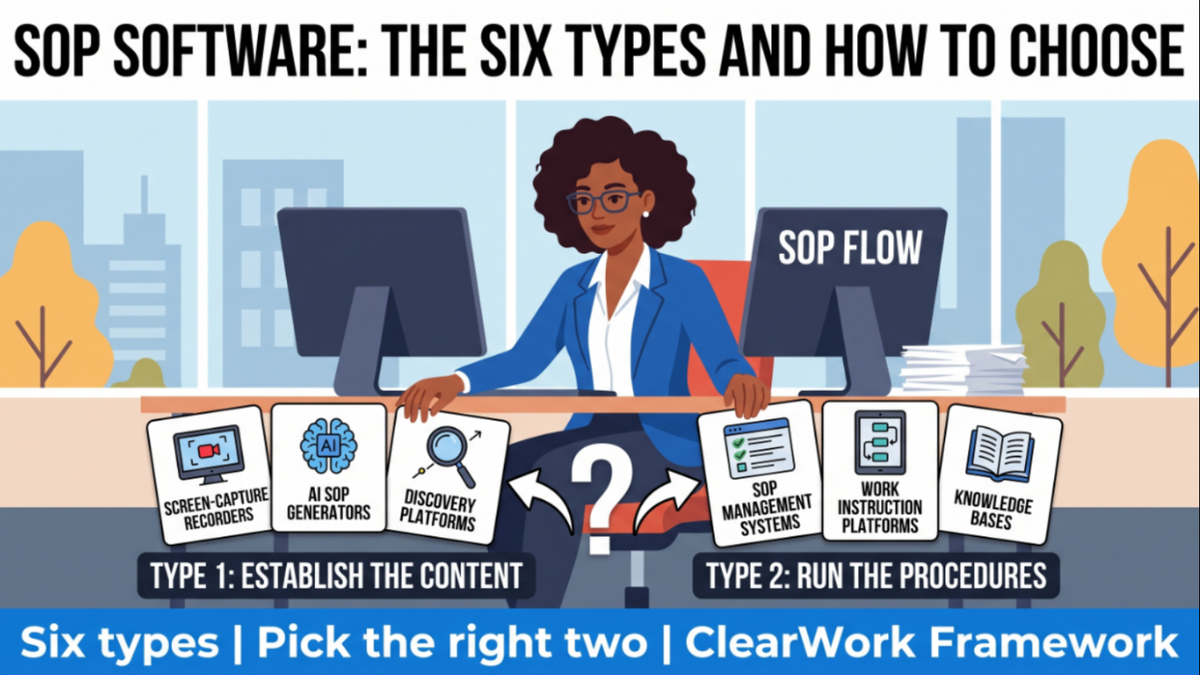
SOP software is any tool that helps a team create, store, update or enforce standard operating procedures. It comes in six types: screen-capture recorders, AI SOP generators, SOP management systems, work instruction platforms, knowledge bases, and discovery platforms that establish how work is really done. Most teams need two: one to get the content right, one to run it.
That last sentence is the one most buying processes skip. Teams compare feature lists inside one type, buy the best of that type, and find six months later that the procedures inside it are still wrong, because the type they bought was built to store or distribute content, not to establish what the content should say. This guide maps all six types, gives you a selection matrix and an eight-question diagnostic, and links to the deeper guide for each part of the problem.
It is written for three readers. Operations and operational excellence leads who have been asked to "get our SOPs in order" and are about to evaluate tools. Quality and compliance owners who need procedures that survive an audit. And consultants who document client processes as part of a transformation and need the output to be usable after they leave.
If you already know which type you need, skip to the section for that type; each ends with a pointer to the full guide. If you are not sure, start with the selection matrix.
Search for "SOP software" and you will get a list that mixes all six types as if they compete. They mostly don't. Each solves a different part of the procedure lifecycle: finding out what the procedure is, writing it down, approving it, getting it in front of the person doing the work, and keeping it true.
The regulated document control row is a sub-type of SOP management with stricter controls. If you are under FDA, ISO 13485 or similar, it is not optional, and nothing else in this table replaces it.
Find the row that describes your actual problem, not the tool you were asked to evaluate. The "demo test" column is the question to ask in the vendor demo; the "red flag" is the answer that means you are looking at the wrong type.
Two patterns fall out of the matrix. First, "our SOPs are wrong" and "our SOPs aren't followed" look the same from a distance and need opposite tools. Second, almost every row that involves creating or correcting content needs a source of truth upstream of the tool that stores it.
Answer yes or no. Count the yeses in each group.
Group A: is the content the problem?
Group B: is distribution or control the problem?
Three or four yeses in Group A: start with discovery (type 6), then generate and format (type 2). Buying a management system first will give you well-controlled wrong procedures. Three or four in Group B: start with management (type 3) or work instructions (type 4, if question 7 is yes). Two or more in both groups: you need one tool from each group, and the content tool goes first, because migrating corrected procedures into a management system is easy and correcting procedures already locked in one is slow.
Screen-capture recorders are the fastest way to document a task that lives entirely inside software. You click through the task once; the tool writes the steps and grabs the screenshots. For onboarding someone onto a CRM screen or an expense tool, that is often all you need, and it beats a hand-written document on both speed and accuracy.
The limits show up the moment the task involves judgment. A recorder sees that you clicked "Approve"; it does not see that you approved because the vendor was on a list in your head, or that you would have escalated if the amount had been over a threshold nobody wrote down. It records the happy path you happened to take. Exceptions, offline steps (a phone call, a check in another system you didn't record), and the reason for each step are invisible to it.
That is why the most-searched comparison in this space, alternatives to Scribe, is really a question about which of those limits matter for your work. Our comparison of Scribe alternatives and process intelligence platforms walks through where recording is the right answer and where it produces a confident, incomplete SOP.
Use capture tools for stable, software-only tasks with few exceptions. Pair them with something else for anything involving decisions.
AI SOP generators solve the blank page. Give one a transcript, a few bullet points or even a title, and it returns a formatted procedure with a purpose statement, scope, roles, steps and a revision table. For teams that have never written SOPs, that is a real step forward, and the formatting alone saves hours.
The problem is that a generator writes what a plausible procedure looks like, not what your procedure is. If the input was a manager's summary, the output is the process as designed, not as done. If the input was nothing, the output is a generic procedure with your company's name on it. Either way it reads well, which makes the gaps harder to spot. We wrote about this in AI SOP generation: what actually works versus hype, and the short version is that the quality of an AI-drafted SOP is capped by the quality of the evidence you feed it.
Three practices make generators useful. Feed them real evidence (interview transcripts, recordings, the documents people actually use), not prompts. Require every step to be traceable to a source. And have the people who do the work review the draft before anyone approves it. The step-by-step guide to automating SOP creation with AI lays out that workflow, and SOP templates versus AI SOP generation covers when a plain template is still the better choice.
For the category view, including what to test in a demo, see our guide to AI SOP generators and process documentation software.
SOP management systems are what most people picture when they hear "SOP software." They hold the approved version of each procedure, route revisions for approval, assign procedures to roles, track who has read and acknowledged what, and often turn procedures into checklists people run day to day. Regulated document control systems do the same with stricter audit trails and electronic signatures.
This is the right purchase when the content is broadly correct and the problem is control: you cannot prove who saw what, revisions go out by email, or training on procedures is a spreadsheet. It is the wrong first purchase when the content itself is unreliable, because these systems are built to distribute and govern what you put in them, not to check it.
Auditors notice the difference. As we covered in what auditors actually want from SOPs, a perfectly controlled procedure that does not match observed practice is a finding, not a pass. Control proves the document was approved; it does not prove the document is true.
When you evaluate, test three things: how a revision moves from draft to approved, how the system tells an owner a procedure is due for review, and what happens to in-flight checklists when a procedure changes. Then ask where the revised content will come from, because the system will not tell you.
Work instructions are the step-level, often visual, version of an SOP, used where the work happens: on a production line, at a repair bench, in a field service van. Work instruction platforms show one step at a time on a tablet or station screen, with photos, video, torque values or tolerances, and they often capture sign-offs or data at each step.
The distinction from SOP management is the reader. An SOP tells a role what the process is and who is responsible; a work instruction tells the person holding the tool exactly what to do next. Manufacturers, field service teams and quality functions buy these platforms because a binder or a PDF on a shared drive cannot be read with gloves on.
They are rarely the right tool for office or knowledge work. A claims handler or a finance analyst does not need a step-by-step visual on a station screen; they need to know which rules apply to the case in front of them, which is a content problem, not a display problem.
If your work is physical and repeatable, start here. If it is knowledge work with many exceptions, the earlier sections apply instead. Either way, the instructions are only as good as the process knowledge that went into them, which is usually held by the most experienced operators and changes faster than the instructions do.
Most companies already own a knowledge base, and most SOPs already live in one. Wikis and workspaces are excellent at holding and searching content and poor at keeping it structured, owned and current, because they treat a procedure the same as a meeting note.
That is the distinction in our piece on process documentation versus knowledge management: knowledge management helps people find what is known; process documentation defines how work is done and who owns each step. A wiki can hold both, but it will not enforce the difference. Our guide to building living operational knowledge in 2026 covers how to make the knowledge side work.
A middle path many process excellence teams take is a structured process repository, sometimes called a collaboration space, that sits between a wiki and a management system: processes, SOPs, owners and improvement ideas in one place, with a governance model on top. We covered the modern process repository beyond Confluence and Notion, how to operationalize a collaboration space with clear ownership, and how AI-powered collaboration spaces connect discovery to continuous improvement.
The test for any of these tools is the same: open a procedure at random and ask who owns it and when someone last checked it against the work. If there is no answer, the tool is a filing cabinet.
Whichever tool you buy, the procedure inside it needs the same parts. Teams that skip a standard end up with SOPs that vary by author, which is how a repository of 300 procedures becomes unusable. The table below is the minimum we recommend; process documentation best practices for 2026 covers governance models around it.
The last two rows are what separate a procedure people trust from one they work around. Without a source and validation record, nobody can tell whether a step reflects practice or a guess; without an owner, nobody fixes it when the process changes.
Most SOP programs succeed in month one and fail in month three. The procedures were right when written, the process changed, and nothing connected the change to the document. Our guide on keeping SOPs current with review cycles that survive month two gives the governance mechanics: owners, triggers, review cadences tied to risk.
Calendar reviews alone rarely work, because the reviewer reads the document, sees nothing obviously wrong, and signs it off. Event-driven reviews work better: a system change, a policy change, a new exception type, a spike in errors or a new hire's question each trigger a check of the affected procedure. The case for this is made in living SOPs versus static documentation.
The cost of not doing it is larger than stale documents. Improvement work decays when the documentation that encoded it drifts, which is the pattern in why process improvement gains fade: the new way of working was never written into the procedure people actually use, so the old way returns.
A practical rule: every SOP gets a named owner, a risk-based review interval (quarterly for high-risk, annually for low), and at least two event triggers. The review itself should go back to the people doing the work, not just reread the page.
Every type of SOP software above assumes someone already knows what the procedure is. That assumption is where most SOP projects quietly fail. The process owner describes the process as designed; the people doing the work follow a version with extra checks, workarounds and judgment calls; and the SOP records the first while the work follows the second.
Traditional fixes are workshops and interviews, which are slow, depend on who is in the room, and produce notes that someone then rewrites into a document, losing the link between each statement and who said it. That is the failure described in why traditional process mapping and documentation fail. The alternative is to treat discovery as its own step with its own output: a validated current-state description, with sources, that the SOP is then written from. Our workflow from process discovery to SOPs shows that sequence end to end.
This is the step ClearWork is built for. ClearWork's automated discovery elicits how work actually happens from the people who do it, through AI-guided asynchronous interviews, screen recordings, meeting capture and the documents they already use. Its agent, Clarity, flags where two people describe the same step differently and lists what is still unknown. A person validates each finding before it enters the record, and every step in the resulting process map, SOP or requirements set links back to its source. It augments the judgment of the team doing the documentation; it does not decide what the procedure should be.
What it does not do matters as much. ClearWork is not SOP management software: it does not run approval workflows, assign training or collect acknowledgments. Teams typically pair it with a type 3 or type 4 tool and use ClearWork to produce and refresh the validated content those tools distribute.
Be honest about this before you book any demo, ours included.
ClearWork is the wrong choice if your procedures are already accurate and your problem is distribution, acknowledgment or audit trail: buy an SOP management system or regulated document control. It is the wrong choice for frontline, physical work where the need is step-by-step instruction at a station: buy a work instruction platform. It is the wrong choice if you need a quick guide to a stable software task with no decisions in it: a capture recorder is faster and cheaper. And it is the wrong choice if you want a tool to write SOPs without involving the people who do the work, because its whole method is to involve them.
It is the right choice when the content is the problem: procedures disagree with practice, rules live in people's heads, a process is about to be automated or handed to AI, or a consultant needs to document a client's current state in a form that survives the engagement.
Not always. A team of under 20 with a handful of stable procedures can run well on a shared document library with named owners and review dates. Dedicated SOP software starts to pay off when you need acknowledgment tracking, formal approvals, procedures at the point of work, or when nobody can tell which version is current.
There is no single best tool, because the types solve different problems. Use the selection matrix above: if your SOPs are wrong, start with discovery; if they are not followed or not controlled, start with SOP management or work instructions; if they are scattered, fix ownership in your knowledge base first.
No. A document management system stores and versions files of any kind. SOP management software adds procedure-specific features such as role assignment, acknowledgment tracking, review reminders and runnable checklists. Regulated industries usually need a document control system that does both with electronic signatures and audit trails.
AI can draft and format SOPs quickly, but it can only be as accurate as the evidence you give it. Feed it interview transcripts, recordings and real documents rather than prompts, require every step to trace to a source, and have the people who do the work review the draft before approval.
Use a risk-based interval, typically quarterly for high-risk procedures and annually for low-risk ones, plus event triggers such as a system change, a policy change, a new exception type or an error spike. A review should check the procedure against the work, not just reread the document.
Run the eight-question diagnostic, then fix where your SOP content comes from before you buy a tool to store it.
Most SOP software stores and distributes procedures; very little of it checks whether those procedures match the work. If your diagnostic pointed to Group A, see how ClearWork's automated discovery captures and validates how work actually happens and turns it into source-linked SOPs your management system can run. Book a walkthrough and bring one process whose documentation nobody trusts.
The six types of SOP software, what each one cannot do, and an eight-question diagnostic that tells you which two your team actually needs.
Fourteen days, full access, no card required.
No credit card required.