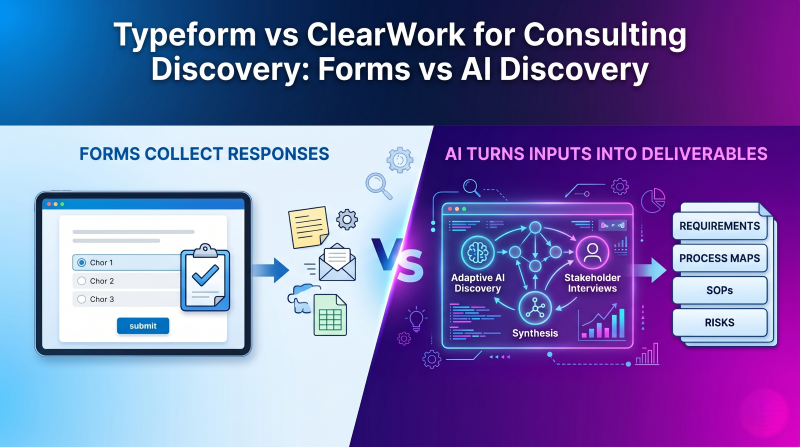
Typeform vs ClearWork for Consulting Discovery: Forms vs Adaptive AI Discovery
Avery Brooks
June 10, 2026
Consulting firms do not struggle because they have no way to ask clients questions.
They struggle because the answers arrive in too many places, in too many formats, with too much left unsaid.
A client fills out an intake form. A stakeholder adds more context in a kickoff call. Someone uploads an outdated process document. A manager explains the official workflow. A frontline employee later describes the workaround everyone actually uses. A partner remembers something from the sales cycle that never made it into the project notes.
Then the consulting team has to turn all of that into something useful: requirements, process maps, SOPs, risks, user stories, project scope, recommendations, and implementation handoff materials.
That is where the difference between a form builder and an AI discovery platform matters.
Tools like Typeform are useful for collecting structured client information. They make intake cleaner, more consistent, and easier for clients to complete. For many consulting firms, that is a real improvement over scattered email threads and ad hoc kickoff questions.
But client discovery is not just intake.
Forms help collect answers. Discovery platforms help consultants understand what the answers mean, what is missing, where stakeholders disagree, and how the information should turn into deliverables.
That distinction matters for any consulting firm trying to improve discovery quality, reduce manual synthesis, protect margin, and create deliverables that can be defended later.
For a broader look at the software categories consulting firms are comparing, see ClearWork’s guide to the best AI client discovery software for consulting firms.
Forms are often one of the first tools consulting firms use to standardize discovery.
The reason is simple: every engagement starts with a set of basic questions.
Who is the client? What is the project about? Which systems are involved? Who are the stakeholders? What pain points are already known? What timeline is the client working toward? What documents should the consulting team review before the first working session?
Without a structured intake process, those questions get asked inconsistently. One consultant sends an email. Another creates a spreadsheet. A partner asks questions live on the kickoff call. A project manager copies an old questionnaire from a prior engagement. The result is a discovery process that depends heavily on who happens to be running the project.
Client discovery form software helps solve that first layer of the problem.
A form gives the firm a repeatable front door for the engagement. It makes the process feel organized. It gives clients a clear place to provide initial information. It reduces the amount of back-and-forth required before the first meeting.
For small and mid-sized consulting firms especially, this can be valuable. A polished intake form can make the firm feel more mature without requiring a heavy process. It also helps new consultants follow a more consistent discovery motion.
Common consulting intake forms usually collect information such as:
That information is helpful. It gives the consulting team a starting point.
But it is still only a starting point.
Typeform is popular because it makes forms feel less painful.
Instead of sending a long spreadsheet or a dense document full of questions, consultants can create a guided intake experience that is easier for clients to complete. The interface is clean. The flow feels modern. The experience is more polished than a traditional form.
For consulting firms, that matters.
Client experience starts before the first workshop. If the first interaction after signing a contract is a confusing email with ten attachments and a list of questions buried in a paragraph, the engagement begins with friction.
A well-designed form creates a better first impression. It tells the client, “We have done this before. We know what we need. We are going to make this easy for you.”
Typeform can be especially useful when the consulting team already knows what information it needs to collect.
For example, a consulting firm might use Typeform to collect basic onboarding information before a strategy sprint. Another firm might use it to gather stakeholder names, current systems, and high-level pain points before an operations assessment. A boutique implementation partner might send a questionnaire before the kickoff meeting so the team can prepare more intelligently.
In those situations, Typeform does its job well.
It helps firms:
For simple, repeatable consulting services, this may be enough.
If the engagement is low complexity, the questions are known in advance, and the output is mainly a kickoff brief or pre-call summary, a form builder can be the right tool.
The problem starts when firms expect the form to do more than collect information.
The biggest limitation of form-based discovery is that forms mostly collect what the consultant already knew to ask.
That is useful for basic intake, but it becomes limiting in real discovery.
Consulting discovery is full of ambiguity. Clients do not always know what details matter. Stakeholders may answer the question they think you asked, not the question you needed answered. Some people describe the official process. Others describe what actually happens. Some answers sound complete until a consultant notices the missing exception, approval path, handoff, control, or system dependency.
A form usually does not behave like an experienced consultant.
It does not hear a vague answer and naturally probe deeper. It does not notice that a stakeholder skipped over the messy part of the workflow. It does not automatically compare one response against another and flag a contradiction. It does not know that an answer should become a requirement, a risk, a process step, or a follow-up question.
Take a simple example.
A client fills out a form and answers the question, “Who approves purchase requests?”
They write: “Finance approves purchase requests.”
That answer is not wrong, but it is not enough.
A consultant still needs to know:
Who in finance approves them?
Are there approval thresholds?
Do urgent requests follow the same process?
Does the process vary by department?
Is approval captured in the system or handled offline?
What happens if finance is unavailable?
Are there exceptions for preferred vendors?
Is the process documented?
Does leadership believe the process works differently than the users do?
A static form may capture the first answer. It usually does not uncover the rest on its own.
That is the central issue with treating forms as discovery.
They can make discovery look structured while still leaving major gaps underneath the surface.
The difference between intake and discovery becomes clearer once the consulting team starts building deliverables.
A form response can tell you what a stakeholder said.
It does not automatically tell you how that response connects to every other input across the engagement.
In a real consulting project, discovery information may come from intake forms, stakeholder interviews, meeting transcripts, workshop notes, uploaded documents, process diagrams, prior assessments, spreadsheets, screenshots, email threads, and partner memory.
The value is not in any single answer. The value is in the synthesis.
Consultants need to understand patterns across sources. They need to compare what stakeholders said. They need to identify missing topics, unresolved questions, conflicting assumptions, and downstream delivery implications.
That is where form builders usually stop.
They help collect the initial inputs, but the consulting team still has to do the hardest part manually.
Someone has to read the responses. Someone has to compare them with meeting notes. Someone has to reconcile conflicts. Someone has to create the first draft of the process map. Someone has to write the requirements. Someone has to turn a vague pain point into a risk. Someone has to remember where a specific recommendation came from when the client challenges it later.
For a small project, that manual effort may be manageable.
For a complex engagement, it becomes a real delivery bottleneck.
Adaptive AI discovery is different because it is built around the discovery workflow, not just the intake form.
Instead of only collecting responses to predefined questions, an AI discovery platform helps consultants gather, structure, synthesize, and convert client knowledge into usable outputs.
The goal is not to replace consultant judgment. The goal is to reduce the repetitive work around capture, follow-up, synthesis, and first-draft deliverables so consultants can spend more time interpreting the findings and advising the client.
Adaptive AI discovery can help consulting teams:
This matters because clients rarely provide perfect discovery inputs.
They provide fragments.
A stakeholder explains one part of the workflow. A document describes another. A meeting transcript reveals an exception. A form response names a system but not the handoff. A workshop board shows a simplified future state, but not the constraints that will affect implementation.
Adaptive AI discovery helps assemble those fragments into a more complete picture.
That is where ClearWork fits.
ClearWork is designed to help consulting firms capture client knowledge from documents, recordings, meetings, and AI-led stakeholder interviews, then turn that knowledge into source-backed deliverables such as process maps, requirements, SOPs, risks, user stories, and implementation handoff materials.
It is not trying to be a prettier form.
It is trying to help consulting teams build the discovery foundation behind the engagement.
Typeform and ClearWork can both support the early stages of a consulting engagement, but they are built for different jobs.
Typeform is strongest when the goal is structured intake. ClearWork is strongest when the goal is to turn discovery inputs into structured, source-backed consulting outputs.
This comparison is not about saying one category is universally better.
It is about choosing the right tool for the job.
If the job is collecting a clean set of initial responses, Typeform may be enough. If the job is turning scattered client knowledge into defensible consulting deliverables, ClearWork is the better fit.
Not every consulting firm needs a full discovery automation platform for every engagement.
There are many situations where a form builder is the right tool.
A form builder may be enough when the project is simple, the questions are known in advance, and the output does not need to become a complex set of deliverables. If the consulting team only needs to collect background information before a call, Typeform can do that well.
For example, a solo consultant running a short strategy session may need to know the client’s goals, current challenges, team size, and desired outcomes. A productized consulting firm may use a standardized questionnaire for every new client. A coach, advisor, or fractional executive may need a clean pre-call form to prepare for the first meeting.
In those cases, a form is useful because the discovery motion is relatively lightweight.
A form builder is often enough when:
The key is to be honest about the outcome.
If the form is meant to prepare the consultant for a conversation, it can work well.
If the form is expected to produce the discovery foundation for a complex engagement, it will likely fall short.
Consulting firms need more than forms when discovery becomes complex, multi-source, or delivery-critical.
That usually happens when the engagement involves multiple stakeholders, unclear current-state processes, conflicting answers, formal requirements, or downstream implementation work.
The more complex the client environment, the more dangerous it is to treat form responses as the full discovery record.
This is especially true in transformation, operations, ERP, CRM, process redesign, system implementation, and documentation-heavy engagements. In those projects, discovery is not just an onboarding step. It is the foundation for scope, design, delivery, change management, and client alignment.
A consulting firm should consider moving beyond forms when:
This does not mean forms should disappear.
Forms can still play a role in intake. They can collect basic information, stakeholder lists, files, and project context.
But they should not be treated as the full discovery engine.
The easiest way to understand the difference is to compare the workflows.
A form-based discovery workflow usually starts cleanly, then becomes manual.
The consultant creates a questionnaire. The client fills it out. The consultant reviews the responses. Then the team schedules follow-up calls, reads uploaded documents, compares notes, identifies missing information, and manually converts everything into deliverables.
The form helped with collection, but the synthesis still happens elsewhere.
A typical form-based workflow looks like this:
That workflow can work, but it depends heavily on manual effort.
An AI discovery workflow is different.
The consulting team starts by defining the engagement context: client, scope, stakeholders, process areas, systems, known issues, timeline, and expected outputs. Existing client materials are uploaded. The platform helps generate a discovery plan. Stakeholders can provide input through AI-led interviews, meetings, documents, recordings, or other sources. The system helps identify gaps, contradictions, and follow-up areas. Consultants review the discovery record and use it to generate source-backed outputs.
A ClearWork-style workflow looks more like this:
The difference is not just efficiency.
It is continuity.
In the form-based workflow, intake is separated from synthesis and deliverables. In the AI discovery workflow, intake becomes part of a larger discovery record that can carry forward into delivery.
ClearWork fits when the real problem is not collecting answers.
It fits when the consulting team needs to understand what the answers mean.
That distinction is important. Many consulting firms already have plenty of ways to collect information. They have forms, meeting notes, transcripts, shared folders, project decks, spreadsheets, whiteboards, and email threads.
The harder problem is turning all of that into a structured, trusted foundation for the engagement.
ClearWork helps consulting firms capture scattered client knowledge and convert it into source-backed deliverables. That includes process maps, requirements, SOPs, risks, user stories, roadmaps, BRDs, RTMs, implementation handoff materials, and a living client knowledge base.
For consulting teams, this creates several practical advantages.
First, ClearWork helps reach more stakeholders without requiring every input to happen in a live meeting. AI-led stakeholder discovery and asynchronous interviews make it easier to collect input from busy subject matter experts across functions, locations, and roles.
Second, ClearWork helps organize discovery around the things consultants actually need to understand: processes, systems, handoffs, exceptions, requirements, risks, gaps, decisions, and ownership.
Third, ClearWork helps preserve the source behind each output. That matters when a client challenges a recommendation, a delivery team asks where a requirement came from, or a project leader needs to understand what evidence supports a decision.
Finally, ClearWork helps reduce manual synthesis. Instead of spending hours turning form responses, transcripts, and documents into first-draft deliverables, the consulting team can use AI to accelerate the draft while keeping consultants in control of review, validation, and client-facing judgment.
For firms trying to standardize this motion, ClearWork for consulting firms and ClearWork Automated Discovery show how discovery can move beyond intake and become a repeatable delivery advantage.
Forms are useful, but they can create false confidence if firms treat them as more complete than they are.
The issue is not the form itself. The issue is assuming that structured responses equal complete discovery.
Here are the common mistakes.
Intake is the beginning of discovery, not the whole process.
A form can collect context before the first call. It can give the team a head start. It can help the consultant prepare better questions.
But the real work of discovery usually happens after the first response.
Consultants still need to probe, validate, compare, clarify, and synthesize. They need to understand not only what the client says, but what the client means and what the answer implies for scope, delivery, design, and change.
Generic questions create generic answers.
Questions like “What are your biggest challenges?” or “What systems do you use?” can be helpful, but they rarely uncover the detail needed for complex consulting work.
A strong discovery process needs role-specific, process-specific, and exception-focused follow-up.
For example, instead of only asking, “What is your current approval process?” a consultant may need to ask how approvals differ by amount, department, geography, vendor type, urgency, system status, and role.
That depth is hard to get from a simple static questionnaire.
When multiple stakeholders complete forms, their answers may not agree.
That is not a problem to hide. It is discovery gold.
Conflicting answers often reveal where the current process is unclear, undocumented, inconsistently followed, or misunderstood. Those conflicts may affect requirements, change management, controls, training, system design, and implementation risk.
The problem is that form responses often sit as separate submissions. Unless someone manually compares them, contradictions can be missed.
A stronger discovery workflow should surface those conflicts early.
Many consulting teams collect intake responses in one tool, then create deliverables somewhere else.
Form responses are copied into notes. Notes become bullets in a deck. Bullets become requirements in a spreadsheet. Requirements later become user stories in another system.
Every handoff creates a chance for context to get lost.
By the time the team is deep into delivery, it may be hard to know where a requirement came from, whether it was validated, or which stakeholder originally raised the issue.
This is one of the biggest reasons discovery should stay connected to deliverables.
Source traceability matters more than many firms realize.
When a client asks, “Why are you recommending this?” or “Where did that requirement come from?” the consulting team should be able to answer clearly.
A weak answer is, “It was in our notes.”
A stronger answer is, “This requirement came from the finance operations interview, was supported by the uploaded approval policy, and was later validated during the process review session.”
That level of traceability builds trust. It also protects the consulting team when scope, requirements, or recommendations are challenged later.
The easiest way to choose between Typeform and ClearWork is to start with the outcome.
If the outcome you need is a structured response, Typeform may be enough.
If the outcome you need is a source-backed consulting deliverable, ClearWork is the better fit.
This is the practical distinction:
Use Typeform when you need a better way to ask known questions.
Use ClearWork when you need a better way to run discovery.
That distinction becomes especially important as a consulting firm grows. A founder-led firm may be able to rely on one experienced partner to interpret every intake response and know what to ask next. But as the firm adds consultants, managers, and delivery teams, discovery needs to become more repeatable.
The goal is not to remove expertise from the process. The goal is to make the firm’s expertise easier to apply consistently.
This comparison does not have to be either/or.
Some consulting firms may still use Typeform for a simple front-end intake experience while using ClearWork for the deeper discovery workflow behind the engagement.
That can make sense when the firm already has a well-designed intake form clients like completing.
In that model, Typeform can collect basic background information, while ClearWork becomes the place where broader discovery is structured, synthesized, validated, and turned into deliverables.
The important thing is to avoid confusing the intake layer with the discovery foundation.
A form can be part of the workflow.
It should not be the whole workflow if the engagement requires deep current-state understanding, formal requirements, process documentation, implementation planning, or source-backed outputs.
Client intake is getting more automated, but the goal should not be to create longer questionnaires.
The goal should be to reduce the amount of manual effort required to get to a clear, accurate, and useful understanding of the client.
That means consulting firms need to think beyond the form itself.
A better intake process should help the firm prepare for discovery, identify what is already known, surface what is missing, and guide the next best questions. It should connect early client input to the broader discovery record. It should make it easier to generate outputs that support scope, delivery, and alignment.
That is why AI discovery platforms are becoming more important.
They help firms move from “we collected answers” to “we understand what this means and can build from it.”
For consulting teams, that is the real opportunity.
Not just cleaner intake.
Better discovery.
Client discovery form software helps consultants collect structured information from clients before or during the discovery phase of an engagement. It is commonly used for intake questionnaires, onboarding forms, project scoping, stakeholder information, pain points, timelines, and initial requirements.
Form software can be useful for standardizing the beginning of discovery, especially when the questions are known in advance. But it should usually be treated as an intake tool, not a complete discovery system.
Typeform can be useful for basic consulting intake and pre-call questionnaires. It is a good fit when the consulting team already knows what information it needs and wants a polished way to collect structured responses.
Typeform is less suited for complex discovery that requires adaptive follow-up, multi-stakeholder synthesis, gap detection, source traceability, and deliverable generation. In those cases, a broader AI discovery platform is usually a better fit.
A consulting intake form usually includes company background, project goals, key stakeholders, current systems, pain points, timeline, budget assumptions, relevant documents, process areas in scope, known constraints, and success criteria.
For complex engagements, the form should be treated as the starting point. The consulting team will still need to validate the answers, ask follow-up questions, compare stakeholder input, and connect discovery findings to deliverables.
A questionnaire collects answers to predefined questions. AI discovery can go further by asking follow-up questions, analyzing documents and transcripts, synthesizing input across stakeholders, identifying missing information, detecting contradictions, and helping generate source-backed consulting deliverables.
The difference is that a questionnaire is mainly a capture tool. AI discovery is designed to support the broader workflow from client input to structured discovery outputs.
Consultants should move beyond forms when discovery involves multiple stakeholders, unclear current-state processes, conflicting answers, complex requirements, or deliverables that need to support implementation.
Forms are useful for intake, but they are not enough when discovery needs to become requirements, process maps, SOPs, risks, user stories, and handoff materials. The more complex the engagement, the more important it is to connect intake to a broader discovery platform.
Typeform and other form builders are useful for collecting client information, but consulting discovery does not end when the form is submitted.
The real work is turning that information into a clear, complete, and defensible understanding of the client environment.
ClearWork helps consulting firms turn scattered client intake and discovery inputs into source-backed process maps, requirements, SOPs, risks, user stories, and delivery-ready documentation.
If your team is still relying on forms, meetings, whiteboards, and scattered notes to run client discovery, ClearWork gives you a more repeatable way to capture what clients actually know. Use AI-led discovery, document synthesis, and source-backed deliverable generation to reduce manual effort without losing consultant judgment. Learn how ClearWork helps consulting teams move from intake to defensible discovery through ClearWork for consulting firms and ClearWork Automated Discovery.
Forms are a helpful starting point for consulting discovery, but they rarely capture the nuance, follow-up, contradictions, and source context needed for complex client work. ClearWork gives consulting teams a more complete way to move from intake to structured discovery by combining AI-led stakeholder input, document synthesis, gap detection, and source-backed deliverable generation. Learn how ClearWork helps firms turn scattered client knowledge into process maps, requirements, SOPs, risks, user stories, and implementation-ready documentation through ClearWork for consulting firms and ClearWork Automated Discovery.
Fourteen days, full access, no card required.
No credit card required.