Client Portal vs Discovery Automation Platform: What Consultants Actually Need
Avery Brooks
June 10, 2026
A new client signs. Everyone is excited. Then the real work begins.
The consulting team needs stakeholder names, kickoff inputs, current-state documents, system details, process context, meeting schedules, file access, approvals, and answers to basic onboarding questions. The client starts sending information through email, shared folders, chat messages, meeting notes, spreadsheets, and random follow-up threads.
Within a week, the engagement already feels scattered.
That is why many consulting firms start looking for a client portal for consultants. A client portal creates a cleaner place for onboarding, communication, file sharing, requests, and project visibility. It gives clients one place to go and gives the consulting team a more organized way to manage the relationship.
That is useful.
But a client portal does not automatically improve discovery.
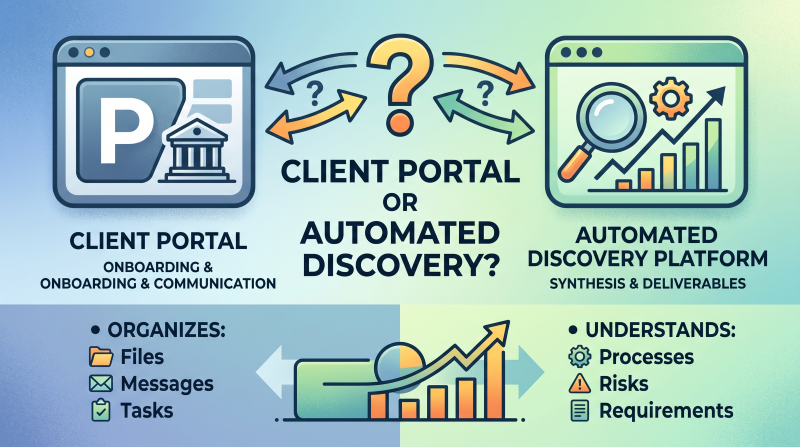
A portal may organize files and messages, but it does not necessarily understand what those files mean. It may collect onboarding tasks, but it does not identify whether the current-state process is incomplete. It may centralize communication, but it does not automatically turn stakeholder input into requirements, process maps, SOPs, risks, user stories, or implementation handoff materials.
That is the difference between a client portal and a discovery automation platform.
A client portal helps manage the client-facing workspace.
A discovery automation platform helps consulting teams turn client knowledge into structured, source-backed deliverables.
For a broader look at the software categories consulting firms are comparing, see ClearWork’s guide to the best AI client discovery software for consulting firms.
Consulting firms use client portals because client work gets messy quickly.
Even a well-run engagement can create a surprising amount of administrative drag. The client needs to upload documents. The consulting team needs to request missing information. Stakeholders need to know what is due. The project manager needs visibility into open tasks. The client sponsor wants to know what has been completed. The delivery team needs a place to find the latest files.
Without a system, all of that spreads across tools.
One file is in an email attachment. Another is in Google Drive. A stakeholder answers a key question in a Teams message. A project manager tracks open items in a spreadsheet. A partner has important sales context in personal notes. The client asks, “Where should I upload this?” and the consulting team spends time just keeping the engagement organized.
A client portal helps create order.
It gives the engagement a central workspace where the client can complete onboarding steps, upload materials, review requests, communicate with the consulting team, and track what is outstanding.
For small and mid-sized consulting firms, this can be especially helpful. A portal can make the firm feel more polished and mature without requiring a large operations team. It gives clients a clearer experience and helps consultants avoid constant administrative follow-up.
Common client portal use cases include:
That is a real problem worth solving.
But it is not the same problem as discovery automation.
Client portals are valuable because they improve the client-facing workflow.
They reduce friction at the beginning of an engagement. They give clients a clear place to go. They help the consulting team look organized. They reduce the number of scattered email threads and make it easier to manage documents, requests, and onboarding steps.
For many firms, that is a meaningful improvement.
A client portal can help consulting teams answer basic operational questions:
Where should the client upload documents?
Which onboarding tasks are complete?
What files have been shared?
What requests are still outstanding?
Where can the client find key project materials?
Who needs to respond to the next action item?
That matters because client experience shapes the early tone of the engagement. If the first few weeks are disorganized, the client may start to question the firm’s process before the real advisory work even begins.
A well-run portal can create a smoother experience.
Client portals are especially useful for:
For firms that offer repeatable services, client portals can be a strong fit. They help standardize how clients enter the firm’s delivery process. They can also reduce the time consultants spend chasing documents, links, and basic onboarding information.
A client portal is often the right tool when the main problem is collaboration and communication.
The issue is that consulting discovery usually requires more than collaboration and communication.
The core limitation of a client portal is that it usually organizes information rather than interpreting it.
A portal can tell the client where to upload a document. It may not tell the consulting team whether that document is current, complete, accurate, or contradicted by what stakeholders said in interviews.
A portal can show that a client completed an onboarding checklist. It may not tell the team whether the right stakeholders have been included in discovery.
A portal can store files, messages, forms, and tasks. It may not synthesize those inputs into requirements, risks, process maps, SOPs, or implementation handoff materials.
That matters because consulting discovery is not just about collecting information from the client. It is about understanding the client’s operating reality.
A consulting team needs to know how work actually happens, where processes break down, which stakeholders are involved, what systems are used, what exceptions exist, which requirements are implied, and where delivery risks are hiding.
A client portal does not usually answer those questions on its own.
For example, imagine a client uploads an SOP into the portal. Later, a stakeholder messages the team and says, “That is the official process, but we do not really follow it when requests are urgent.” Then, during a meeting, another stakeholder explains that a regional team uses a different workflow entirely.
The portal can keep those items organized.
But someone still has to connect them.
A consultant has to determine whether the SOP reflects reality, whether the urgent workaround changes requirements, whether the regional variation should be documented, whether the issue creates a risk, and whether the process map needs to show multiple paths.
That is discovery work.
And if the consulting team still has to do all of that synthesis manually, the portal has not solved the deeper problem.
A discovery automation platform helps consulting teams capture, structure, synthesize, and convert client knowledge into usable consulting outputs.
Where a client portal organizes the client relationship, a discovery automation platform helps understand the client’s business.
That difference is important.
Discovery automation is not just a better place to store files. It is a more structured way to gather input from stakeholders, analyze documents and transcripts, identify missing information, detect contradictions, and generate source-backed deliverables.
For consulting firms, that can change the way discovery works.
Instead of starting with a portal full of files and messages, then manually converting those inputs into client-ready outputs, the consulting team can build a living discovery foundation. That foundation can support requirements, process maps, SOPs, user stories, risks, decisions, and implementation handoff materials.
A discovery automation platform should help answer questions like:
Who have we heard from?
Which stakeholders are missing?
What documents have been reviewed?
Which process areas are incomplete?
Where do stakeholders disagree?
Which risks have been identified?
Which requirements are supported by source evidence?
What needs consultant review before it becomes client-facing?
Which deliverables can be drafted from the discovery record?
ClearWork is built for this broader discovery workflow.
ClearWork helps consulting firms capture scattered client knowledge from documents, recordings, meetings, and AI-led stakeholder interviews, then turn that knowledge into source-backed deliverables such as process maps, requirements, SOPs, risks, user stories, and implementation handoff materials.
The goal is not to replace consultant judgment.
The goal is to reduce the repetitive work around capture, follow-up, synthesis, and first-draft deliverables so consultants can spend more time advising the client.
Client portals are strongest for onboarding, communication, file sharing, and project organization.
Discovery automation platforms are strongest when the information collected during the engagement needs to become structured client intelligence and delivery-ready outputs.
The distinction is not about which category is better. It is about what problem the consulting firm is trying to solve.
A client portal may be enough when the primary goal is client organization, not deep discovery.
Some firms do not need a more advanced discovery workflow for every engagement. If the service is simple, repeatable, and mostly administrative, a portal can be the right choice.
For example, a productized consulting firm may need clients to upload documents, complete onboarding tasks, review requests, and communicate in one place. A client portal can handle that well. It creates a more professional experience and reduces scattered communication.
A portal may be enough when:
In those cases, a portal solves the right problem.
It gives the client one place to go and gives the consulting team a cleaner way to manage the relationship.
The risk is assuming that a more organized workspace automatically creates better discovery.
It does not.
Consultants need more than a portal when the engagement requires understanding how the client actually works.
That usually happens when the project involves transformation, implementation planning, process redesign, operational improvement, system selection, documentation, or complex current-state discovery.
In those projects, the consulting team is not only collecting files. It is trying to understand the client’s operating model.
That means the team needs to know:
Which stakeholders need to be included?
What processes are in scope?
Where does the official process differ from reality?
Which handoffs create delays?
Which systems are involved?
Where are the exceptions?
What risks should be escalated?
Which requirements are implied by the discovery findings?
What should carry forward into implementation?
Those questions cannot be answered by a portal alone.
A discovery automation platform becomes more important when:
If the portal is where information enters the engagement, discovery automation is what helps the consulting team turn that information into something the client can use.
One reason this comparison gets confusing is that many firms blur onboarding and discovery.
They are related, but they are not the same.
Client onboarding is the process of getting the engagement set up.
It includes administrative steps, stakeholder lists, access requests, document uploads, kickoff scheduling, communication norms, billing details, and project setup tasks.
A client portal is very useful here.
It gives the client one place to complete tasks, upload materials, and understand what the consulting team needs from them.
Client discovery is different.
Discovery is where the consulting team learns how the client actually operates, what the current state looks like, what needs to change, where risks are hiding, which requirements matter, and what delivery needs to account for.
That requires more than a clean onboarding checklist.
It requires structured knowledge capture, stakeholder input, document review, follow-up questions, synthesis, validation, and deliverable creation.
A client can complete every onboarding task and discovery can still be incomplete.
The portal may show that documents were uploaded, stakeholders were added, and forms were completed. But that does not mean the consulting team understands the process, has identified the right risks, or has captured the requirements needed for delivery.
This is why consulting firms need to separate two questions:
Do we need a better client experience?
Or do we need a better discovery foundation?
Often, the answer is both. But they are different needs.
The workflow difference is where the comparison becomes practical.
A client portal workflow improves organization. A discovery automation workflow improves how client knowledge becomes usable output.
A typical client portal workflow looks like this:
This can make the engagement feel much more organized.
But the synthesis still happens manually.
The portal may store the SOP, the intake form, and the stakeholder response. The consultant still has to read everything, identify what matters, compare the inputs, and turn the findings into deliverables.
A discovery automation workflow is different.
A ClearWork-style workflow looks more like this:
The difference is that discovery automation connects intake, stakeholder input, source evidence, and deliverables into one discovery foundation.
That continuity matters.
When discovery is disconnected from deliverables, context gets lost. A stakeholder statement becomes a note. The note becomes a bullet in a deck. The bullet becomes a requirement in a spreadsheet. Weeks later, no one remembers where the requirement came from or whether it was validated.
A discovery automation platform helps preserve that thread.
ClearWork is not trying to replace every client portal.
It is not primarily a file-sharing tool, messaging system, or client workspace.
ClearWork fits when the consulting team needs the knowledge collected during onboarding, discovery, interviews, and document review to become source-backed consulting deliverables.
That is a different job.
ClearWork helps consulting firms turn scattered client knowledge into:
ClearWork is especially useful when discovery has to support real delivery work.
If a firm is running an ERP discovery, CRM implementation, operating model review, process redesign, documentation project, or transformation planning engagement, the team needs more than uploaded files and organized messages. It needs a structured understanding of the client’s current state and a way to turn that understanding into outputs.
ClearWork helps by supporting AI-led stakeholder discovery, asynchronous interviews, document and transcript synthesis, gap detection, contradiction detection, and source-backed deliverable generation.
The value is not just speed.
The value is better continuity from discovery to delivery.
Instead of treating onboarding content, meeting notes, stakeholder input, and deliverables as separate artifacts, ClearWork helps create a shared discovery foundation that the consulting team can use throughout the engagement.
ClearWork fits when the real problem is not that the client lacks a place to upload information. It fits when the consulting team needs to understand, validate, and use that information to drive delivery.
Learn more about ClearWork for consulting firms and ClearWork Automated Discovery.
Client portals can be valuable, but they can also create false confidence.
The engagement may look organized on the surface while discovery remains incomplete underneath.
Here are the most common mistakes.
A portal can make files easier to find.
That does not mean the consulting team understands what the files mean.
A client may upload a process document that is outdated, incomplete, or based on how leadership thinks the process works rather than how work actually happens. If the team accepts the document at face value, it may build recommendations on weak evidence.
Organization is useful. Understanding is different.
Client documents are often imperfect.
An SOP may describe the official process, but not the workaround. A training guide may reflect a previous system release. A process map may leave out the exception path. A requirements document may represent what one department wants, not what the full organization needs.
A portal can store those documents neatly.
Discovery still has to validate them.
A portal is supposed to reduce scattered work. But if the content inside the portal does not connect to interviews, process maps, requirements, risks, and handoff materials, it can become one more silo.
The consulting team may still have files in the portal, notes in a document, requirements in a spreadsheet, diagrams in another tool, and decisions in a slide deck.
That creates a familiar problem: everything exists, but nothing is connected.
A completed onboarding checklist does not mean discovery is complete.
The client may have uploaded the requested files and answered the intake questions, but the team may still not understand the process, risks, exceptions, requirements, or delivery implications.
This matters because incomplete discovery often shows up later as rework, scope change, or implementation confusion.
Task completion is useful for project management. It is not the same as validated discovery.
When recommendations and deliverables are created manually outside the discovery record, the team can lose track of where key insights came from.
That becomes a problem when a client asks, “Why did you include this requirement?” or “Where did that recommendation come from?”
A strong consulting team should be able to trace important outputs back to the source: a stakeholder interview, uploaded document, meeting transcript, validated decision, or unresolved assumption.
Source traceability makes discovery easier to defend.
The simplest way to choose is to start with the outcome.
Use a client portal when the main goal is client collaboration, onboarding, file sharing, and communication.
Use ClearWork when the main goal is discovery automation, synthesis, source traceability, and deliverable generation.
If the outcome you need is a cleaner client experience, a portal may be enough. If the outcome you need is a defensible discovery foundation, you need discovery automation.
This does not have to be an either/or decision.
Some consulting firms may use a client portal as the client-facing front door while using ClearWork as the discovery intelligence layer behind the engagement.
That can be a strong combination.
The portal manages communication, files, onboarding tasks, and client-facing collaboration. ClearWork structures and synthesizes the client knowledge gathered from forms, documents, meetings, recordings, and stakeholder interviews. Consultants then use ClearWork to generate deliverables from validated discovery context.
In that model, the portal organizes the relationship.
ClearWork organizes the knowledge behind the work.
The important thing is to avoid expecting the portal to do the discovery platform’s job.
A portal can improve the client experience. It can make the engagement feel cleaner. It can reduce administrative friction.
But when the consulting team needs to understand how the client actually works and turn that understanding into defensible outputs, a discovery automation layer becomes much more important.
A client portal for consultants is a client-facing workspace used to manage onboarding, communication, file sharing, tasks, requests, and project visibility.
It helps create a more organized client experience and reduces reliance on scattered email threads. Many consulting firms use portals to collect documents, manage onboarding checklists, share resources, and centralize client communication.
Client portals can support consulting discovery by organizing files, messages, tasks, and intake materials.
However, they usually do not synthesize client input, identify gaps, detect contradictions, or generate source-backed consulting deliverables. A client portal is helpful for organization, but it is not a complete discovery system when the engagement requires process understanding, requirements, SOPs, risks, or implementation handoff materials.
A client portal organizes the client-facing workflow.
A discovery automation platform helps consulting teams capture, structure, synthesize, and turn client knowledge into outputs such as requirements, process maps, SOPs, risks, user stories, and implementation handoff materials.
The portal helps manage the relationship. The discovery automation platform helps understand and use the knowledge created during the relationship.
Client portal tools can improve onboarding, communication, file sharing, and request management. They may support parts of the discovery workflow by collecting information or keeping client materials organized.
But they are not usually built to perform adaptive stakeholder discovery, multi-source synthesis, gap detection, contradiction detection, or source-backed deliverable generation. Those are the capabilities consulting firms typically need from a discovery automation platform.
Consulting firms should use ClearWork when discovery involves multiple stakeholders, complex current-state processes, unclear requirements, scattered source materials, or deliverables that need to support implementation.
A portal can help manage the client experience, but ClearWork helps turn client knowledge into defensible consulting outputs. It is especially useful when the firm needs process maps, requirements, SOPs, risks, user stories, roadmaps, or handoff materials that are connected back to source evidence.
Client portals are useful for organizing onboarding, files, messages, and client-facing collaboration.
But consulting firms need more than organized collaboration when discovery has to support delivery.
The real value comes from turning client knowledge into a structured, source-backed foundation the consulting team can use to scope, plan, document, implement, and advise with confidence.
A client portal can make onboarding cleaner, centralize files, and reduce scattered communication, but it does not automatically synthesize client knowledge or turn discovery inputs into consulting outputs. ClearWork gives consulting teams a more complete way to capture stakeholder input, analyze documents and transcripts, identify gaps, and generate source-backed process maps, requirements, SOPs, risks, user stories, and implementation handoff materials. Learn how ClearWork helps firms move from client collaboration to defensible discovery through ClearWork for consulting firms and ClearWork Automated Discovery.
Fourteen days, full access, no card required.
No credit card required.