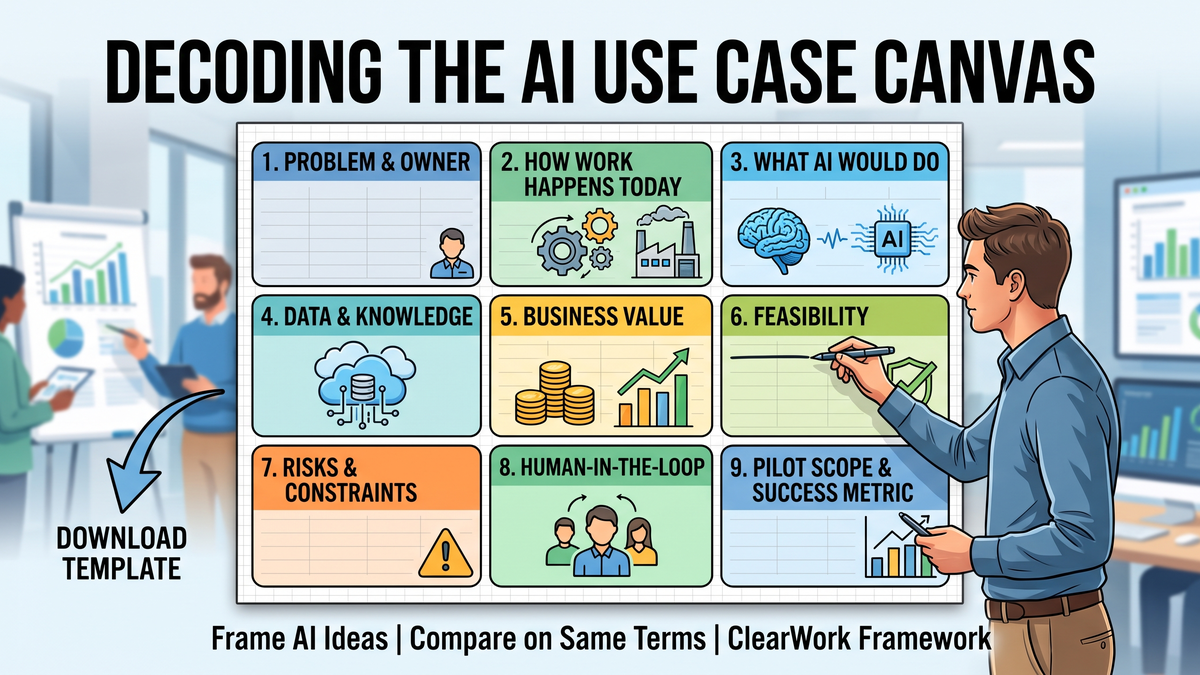
The AI Use Case Canvas: A One-Page Template for Framing AI Ideas Before You Score Them
Avery Brooks
October 3, 2026
An AI use case canvas is a one-page template that frames one AI idea in nine boxes: the problem, how the work happens today, what the AI would do, the data and knowledge it needs, business value, feasibility, risks, human oversight, and the pilot's success metric. Fill it before scoring, so every idea is compared on the same terms.
The canvas is the first of the three tools in ClearWork's AI use case identification framework: canvas to define, framework to test fit, impact–feasibility matrix to rank. This article is the canvas itself. You can download the AI use case canvas template (Excel, no email required); it includes a completed example and a register so you can score a batch of canvases side by side.
Most AI idea lists die in the scoring step, and not because the scoring is wrong. They die because the ideas were never written down in a way that can be compared. "Use AI in customer onboarding" and "auto-classify inbound supplier invoices and route exceptions to the right approver" are not the same size of thing, and no impact–feasibility matrix can fix that.
A canvas forces each idea through the same nine questions. Some ideas shrink when you write them down: the business value box turns out to be "saves a bit of time." Some ideas grow: the data box reveals the knowledge already exists in a team's inbox and nobody has structured it. Either way you learn it in thirty minutes rather than in month four of a pilot. The step-by-step guide to identifying generative AI use cases puts the canvas at step two of seven; this piece stays on that one step.
Boxes 2 and 4 are the ones most teams leave thin, and they are the ones that decide whether box 6 is honest. If nobody has written down how the work actually happens, including the exceptions, the feasibility score is a guess. The canvas template marks those two boxes as "validated?" so you record whether the answer came from the people doing the work or from an assumption.
Do it with the process owner and one person who does the work daily, not with the AI team alone. Start at box 1 and write the problem as a number: "AP handles 1,400 invoice exceptions a month; each takes 12 minutes and 30% are routed to the wrong approver first." Then box 2, in their words, including the workaround nobody admits to in a steering committee. Box 3 only after box 2, because you cannot say what the AI takes over until you can see the steps. Boxes 4 through 9 follow in ten minutes once the first three are concrete.
Write in the spreadsheet, not on a whiteboard photo. The register tab reads the value and feasibility boxes from every canvas you add, so the batch you frame this week is already sorted for the prioritization workshop.
The worked example in the download is a mid-market finance team. Problem: 1,400 exceptions a month, 12 minutes each, 30% misrouted. How the work happens today: an analyst opens the invoice, checks three systems, applies a routing rule that exists only in a shared inbox's folder structure, and emails the approver. What the AI would do: classify the exception type and draft the routing with a confidence score; anything under the threshold goes to the analyst. Data: invoice images, PO data, the approver matrix (in a spreadsheet), and the unwritten rules for the 30% that get misrouted. Value: roughly 280 hours a month at the current rate, plus fewer late-payment penalties. Feasibility: extraction plus classification, moderate integration, one blocker: the unwritten routing rules. Risk: a wrong route delays a payment; a wrong amount is worse, so amounts stay human-approved. Human in the loop: analyst reviews everything under 85% confidence for the first month. Pilot: one business unit, 200 exceptions, target 70% routed correctly first time.
The interesting line is the blocker in box 6. The idea is feasible, but only after someone captures the routing rules that live in the analyst's head. That is not an AI problem; it is a discovery problem, and it is why the canvas asks about undocumented knowledge before it asks about models.
A canvas is a framing device. It cannot tell you whether box 2 is true. Teams routinely fill it from the process as they believe it runs, and the gap between that and reality is where pilots stall: the exception nobody mentioned, the second system of record, the approval that happens on a phone call. The AI agent readiness framework makes the same point from the deployment end: agents fail on unclear workflows, not weak models.
If several canvases share the same thin box 2, that is the signal to run structured discovery before scoring. ClearWork's automated discovery does that part: Clarity, its discovery agent, interviews the people who do the work asynchronously, reads the documents you already have, flags what conflicts and what is missing, and holds everything for human validation before it becomes a process map or a requirements matrix. The output drops straight into boxes 2 and 4, with a source behind every line. It does not score or choose your use cases; your team does that with the register and the matrix.
Filling it alone. The AI team writes box 2 from a process document and discovers the real process in the pilot. Skipping the baseline in box 5, so the pilot has nothing to be compared against. Writing box 3 as the technology ("use an LLM") instead of the decision it takes. Treating box 7 as legal's job rather than the place you write down what a wrong answer costs. And keeping canvases as slides, so the register never exists and the prioritization workshop starts from memory.
No. The business model canvas describes a whole business in nine blocks. The AI use case canvas describes one candidate use of AI in nine boxes, and its purpose is to make ideas comparable before scoring. The layout is borrowed; the questions are different.
Enough to have a real choice, usually eight to fifteen. Fewer than five and the matrix ranks whatever you happened to think of; more than twenty and box 2 gets skipped to save time. The register tab in the template handles any number.
The process owner and someone who does the work daily, with the AI or transformation lead facilitating. The AI team alone can fill boxes 3 and 6; only the people in the process can fill boxes 2 and 4 truthfully.
Mark it unvalidated and score feasibility accordingly, or run discovery first. An empty box 2 is useful information: it tells you the process is undocumented, which is itself the first thing to fix before an AI project depends on it.
No. The canvas produces the inputs; the matrix ranks them. The register tab in the template gives each canvas a first-pass impact and feasibility score so the matrix session starts with numbers rather than opinions.
Download the free AI use case canvas and frame your first three ideas this week.
The canvas makes ideas comparable; it does not make box 2 true. If your candidate use cases depend on processes nobody has documented, see how ClearWork's automated discovery captures and validates how the work actually happens, with a source behind every step. Start a free 14-day trial and run discovery on the process behind your top-scoring canvas.
A nine-box AI use case canvas you can download and fill in 30 minutes, with a completed example, a register for scoring, and the box most teams leave blank.
Fourteen days, full access, no card required.
No credit card required.